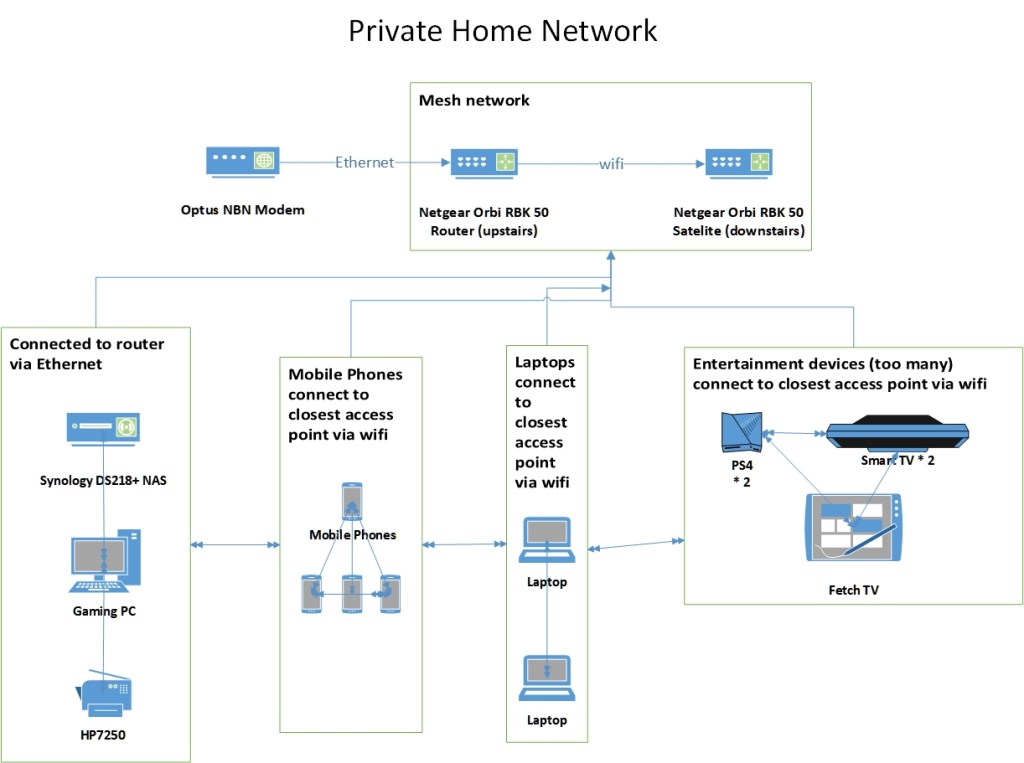
Our family has struggled for many years to obtain good Wi-Fi coverage throughout our two-storey house in Sydney. After much research, we settled on purchasing a Netgear Orbi (router and one satellite node) and set up a home network based on the mesh topology. We also signed up for the fastest speed available from our service provider on the National Broadband Network (NBN).
Our home network is shared between two adults and two screenagers (aged 13 and 16). We have two devices connected directly into the Orbi router – our son’s gaming personal computer (PC) to enable the all important ping times, and our Network Attached Storage (NAS) where all our shared data is stored. Our other devices connect to either the router (upstairs) or the satellite (downstairs) and will switch seamlessly when moved around the house. This includes two PlayStations, two connected televisions, a Fetch television box, two laptops, a multi-function printer and four mobile phones.
For security, we are not yet running a centralised firewall on the router, but Wi-Fi access is secured through a strong password. Our NAS has remote access turned off so it cannot be accessed outside of our private network. Anti-virus and firewall software is installed on each PC, and all connect to the internet through a Virtual Private Network (VPN) for additional security and privacy.
All four stakeholders are very happy with the network’s level of performance, speed, stability, and privacy. The whole family can work online, print, game, stream, and listen to music without any buffering and there are no blackspots. Two stakeholders are also very pleased with the ability to disconnect gaming and mobile devices as required, and find this particularly useful around dinner or bed time. The remaining two stakeholders, however, are less pleased with this feature!
 Libtech
Good description of your home network. Your discussion highlights some of the issues that networks have, particularly in relation to providing WiFi access, and meeting the needs of all users.
LikeLike